
Instruction Symp. A and Room A
ORAL INSTRUCTION for Symposium A and Room A (Section 1-1, 1-2, 1-3, 3) |
|
* Those whose manuscripts are accepted for presentation at the conference should inform MNC if they can participate. (In case of not making a presentation, the presentation will be withdrawn and the paper submission will not be accepted by JJAP.) |
|
 | (1) All authors should register at the registration desk. |
 | (2) All authors are requested to register at the session registration desk no later than 30 min. before the session starts. Please pick a name card point (blue) up there. Author's Interview materilas (Other than Symposium Session, Only section 1-1, 1-2, 1-3, 3, 6) Section oral authors are requested to bring author's interview document less than A4 size, 10 sheet (A cutback of the presentation in Power point etc.) or Please hold the computer with the PPT open and explain in front of the panel. |
 | (3) All presenters are requested to entry the “ZOOM Meeting” only during each talk, and evacuate from the “ZOOM Meeting” after your time allotted. Connect to an Ethernet Plug Wired LAN is the only way to connect to the ZOOM Meeting, and Wi-Fi connection is prohibited. Ethernet LAN cable is the only connection we prepared for wired LAN, so that a presenter whose PC does not equipped with the Ethernet (8P8C) jack should bring an adopter (for example, USB-C to Ethernet 8P8C conversion) with you. If wired is not available, WiFi is available. |
   | (4) Engage to ZOOM Meeting by just pressing the URL in your browser. As we prepared plural Ethernet cables, you should connect to one near the presenter desk and entry to the ZOOM Meeting before your talk starts. How to entry the ZOOM Meeting is just press in your browser the URL: TBD sent by us beforehand and then enter your name. Having your own ZOOM account is not mandatory. Register your name to ZOOM Meeting. Of your own PC, microphone: MUTE (OFF) speaker: OFF camera: ON |
 | (5)Share your presentation material On your own presentation time, you will share your presentation material in the ZOOM Meeting, and start your talk with microphone: “MUTE”, speaker system “OFF”, and camera “ON” of your own PC’s. We recommend the use of “laser-pointer” in PowerPoint or your own PC’s mouse-pointer instead of a “real” laser-pointer because remote audience can not see the “real” laser-pointer. After finishing your allotted time, you immediately release from sharing your slide and evacuate from the ZOOM Meeting. |
 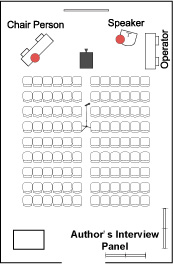 Room Sample | (6). Author's Interview A 10-minutes Author's Interview will be held after each session. The authors are requested to make complementary discussions with participants. Please prepare a set of printed copies of slides used in your presentation. Your materials will be posted on a 90-cm-wide x 210-cm-high surface board by an MNC staff and will be returned after the session. * Note that the Author's Interview is excluded from the Most Impressive Poster Award. (7). Presentation Oral session is 20 min. including 5 min. discussion. Invited session is 30 min. including 5 min. discussion. Plenary Session and Special Talk are 40 min. including 5 min. discussion. The conference staff will be timing the session by ringing the bell. 1) 1st bell : at the end of presentation. (ex. Invited session 25 min.) 2) 2nd bell : at the end of 5 min-discussion (ex. Invited Session 30 min.) |
